<?xml version="1.0" encoding="utf-8"?>
<feed xmlns="http://www.w3.org/2005/Atom">
  <title>Evan You</title>
  
  
  <link href="/atom.xml" rel="self"/>
  
  <link href="http://blog.evanyou.me/"/>
  <updated>2018-12-27T20:27:37.962Z</updated>
  <id>http://blog.evanyou.me/</id>
  
  <author>
    <name>Evan You</name>
    
  </author>
  
  <generator uri="http://hexo.io/">Hexo</generator>
  
  <entry>
    <title>Vue.js: 2015 in Review</title>
    <link href="http://blog.evanyou.me/2015/12/20/vuejs-2015-in-review/"/>
    <id>http://blog.evanyou.me/2015/12/20/vuejs-2015-in-review/</id>
    <published>2015-12-20T15:12:12.000Z</published>
    <updated>2018-12-27T20:27:37.962Z</updated>
    
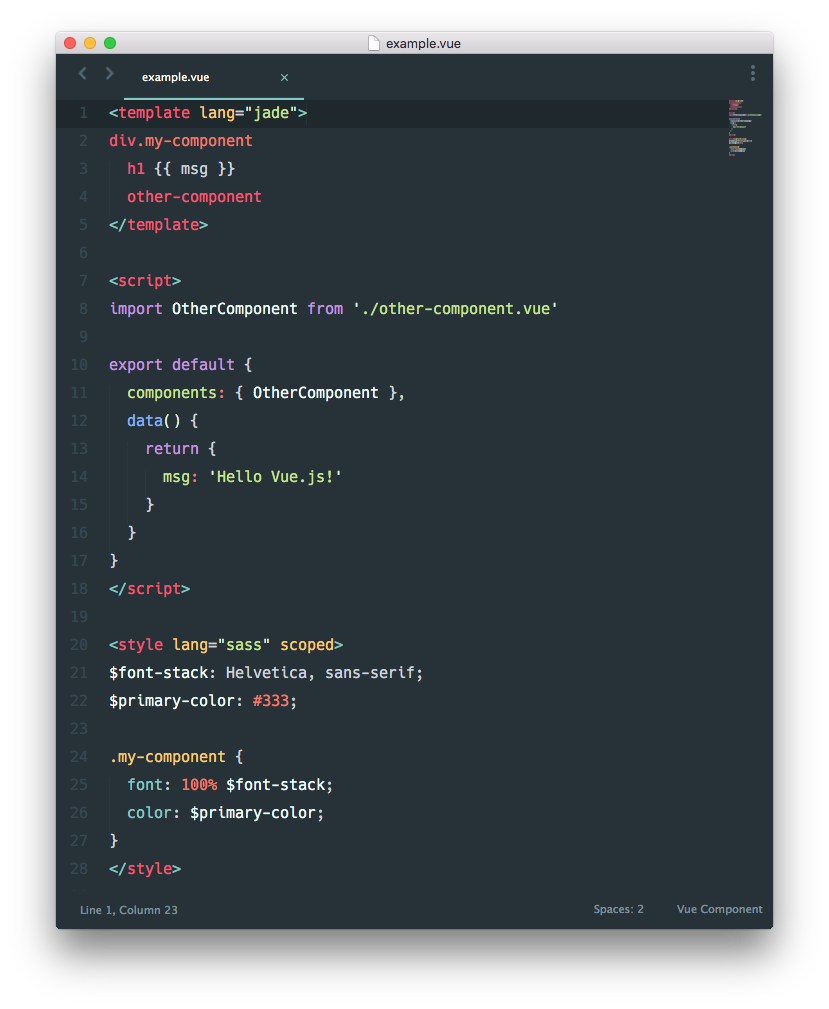
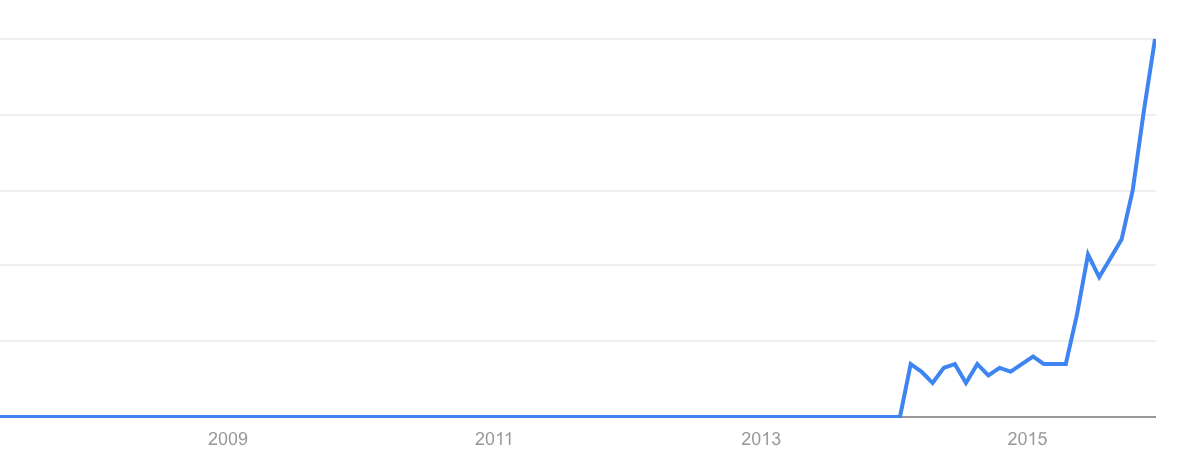
    <content type="html"><![CDATA[<p style="text-align:center"><img src="/images/trend.png" style="width:600px;display:inline-block"></p><p>The year of 2015 has been a pretty crazy ride for Vue.js. The project has grown way beyond my expectations, so I’d like to take a look back and put things in perspective.</p><h2 id="Stats"><a href="#Stats" class="headerlink" title="Stats"></a>Stats</h2><h3 id="General"><a href="#General" class="headerlink" title="General"></a>General</h3><ul><li>NPM downloads: 382,184 ytd, ~52k/month current</li><li>GitHub Stars: 11,357 current</li></ul><p>Unfortunately Bower and CDNs do not offer download statistics - there should be at least equal if not more usage from these sources, since a considerable portion of Vue.js users use it for non-SPA purposes and pull it directly from a CDN.</p><p>The GitHub star count saw a whopping 7.6k+ growth since February. In comparison, the project collected a total of ~3.6k stars in its first year (Feb 2014 - Feb 2015).</p><h3 id="Repo-Activity"><a href="#Repo-Activity" class="headerlink" title="Repo Activity"></a>Repo Activity</h3><ul><li>Releases: 54 ytd (from 0.11.5 to 1.0.12, including alpha/beta/rc releases)</li><li>Commits: 1,023 ytd</li><li>Issues Closed: 1,014 ytd</li><li>Pull Requests Merged: 69 ytd from 43 contributors</li></ul><h3 id="Vuejs-org"><a href="#Vuejs-org" class="headerlink" title="Vuejs.org"></a>Vuejs.org</h3><ul><li>Page views: 3,761,728 ytd</li><li>Unique visitors: 363,365 ytd</li><li>30 Day Active Users: 76,090 current</li></ul><h2 id="Highlights"><a href="#Highlights" class="headerlink" title="Highlights"></a>Highlights</h2><h3 id="Adoption-in-the-Laravel-Community"><a href="#Adoption-in-the-Laravel-Community" class="headerlink" title="Adoption in the Laravel Community"></a>Adoption in the Laravel Community</h3><p>It all started with this…</p><p><blockquote class="twitter-tweet" lang="en"><p lang="en" dir="ltr">Current React learning status: overwhelmed. Learning <a href="https://twitter.com/vuejs" target="_blank" rel="noopener">@vuejs</a> because it looks easy and has pretty website. 👍</p>&mdash; Taylor Otwell (@taylorotwell) <a href="https://twitter.com/taylorotwell/status/590281695581982720" target="_blank" rel="noopener">April 20, 2015</a></blockquote></p><script async src="//platform.twitter.com/widgets.js" charset="utf-8"></script><p>Taylor Otwell, the author of <a href="https://laravel.com/" target="_blank" rel="noopener">Laravel</a>, picked up Vue.js instead of React as he was searching for a new front-end library. Soon afterwards Jeffrey Way created a screen cast series on <a href="https://laracasts.com" target="_blank" rel="noopener">Laracasts</a> which popularized Vue.js in the Laravel community. Today some of the most active Vue.js users are from the Laravel community and there are really cool open source projects like <a href="http://koel.phanan.net/" target="_blank" rel="noopener">Koel</a> built with the two technologies combined.</p><h3 id="Shipping-1-0"><a href="#Shipping-1-0" class="headerlink" title="Shipping 1.0"></a>Shipping 1.0</h3><p>1.0 was some really hard work: careful considerations had to be made on what to deprecate, and there was lengthy, heated discussion around the template syntax overhaul. But in the end I believe we ended up with something most of us are happy with. With the goal of providing a painless migration path, I’m also quite proud that I was able to provide 1.0 builds that are fully backwards-compatible with deprecation warnings.</p><p>The release of 1.0 was a great boost to the project’s adoption. The release post stayed on HackerNews front page for quite a while, gathering more than 300 upvotes. The GitHub star count surged, and Vue has stayed in the GitHub JavaScript trending list almost every day since then. In Google trends, the curve for Vue.js is showing strong growth and <a href="https://www.google.com/trends/explore#q=vuejs%20%2B%20vue.js%2C%20backbone.js%20%2B%20backbonejs%2C%20emberjs%20%2B%20ember.js&amp;cmpt=q&amp;tz=Etc%2FGMT%2B5" target="_blank" rel="noopener">recently surpassed Backbone and Ember</a>.</p><h3 id="Growing-Ecosystem"><a href="#Growing-Ecosystem" class="headerlink" title="Growing Ecosystem"></a>Growing Ecosystem</h3><p>In addition to Vue.js core, we now also have a whole suite of official libraries/tools that help with building larger applications:</p><ul><li><a href="https://github.com/vuejs/vue-loader" target="_blank" rel="noopener">vue-loader</a> and <a href="https://github.com/vuejs/vueify" target="_blank" rel="noopener">vueify</a> for component-based build workflow;</li><li><a href="https://github.com/vuejs/vue-router" target="_blank" rel="noopener">vue-router</a> for routing in SPAs;</li><li><a href="https://github.com/vuejs/vue-devtools" target="_blank" rel="noopener">vue-devtools</a> for live inspection and debugging;</li><li><a href="https://github.com/vuejs/vuex" target="_blank" rel="noopener">vuex</a> for explicit state management in large scale applications.</li></ul><p>Of course, there are also many <a href="https://github.com/vuejs/awesome-vue#libraries--plugins" target="_blank" rel="noopener">awesome community contributed projects</a> - a big shoutout to the community for sharing what you’ve built!</p><h3 id="Podcasts"><a href="#Podcasts" class="headerlink" title="Podcasts!"></a>Podcasts!</h3><p>I did a bunch of podcasts this year, mostly talking about Vue.js. These podcasts touch upon some pretty in-depth topics about Vue.js, so if you are interested about the nitty-gritty details, they are probably worth listening to!</p><ul><li><a href="https://devchat.tv/js-jabber/187-jsj-vue-js-with-evan-you" target="_blank" rel="noopener">JavaScript Jabber</a></li><li><a href="https://changelog.com/184/" target="_blank" rel="noopener">The Changelog</a></li><li><a href="http://www.fullstackradio.com/30" target="_blank" rel="noopener">Fullstack Radio</a></li><li><a href="http://teahour.fm/2015/08/16/vuejs-creator-evan-you.html" target="_blank" rel="noopener">Teahour.fm (Chinese)</a></li></ul><h2 id="Reflections"><a href="#Reflections" class="headerlink" title="Reflections"></a>Reflections</h2><h3 id="The-Progressive-Framework"><a href="#The-Progressive-Framework" class="headerlink" title="The Progressive Framework"></a>The Progressive Framework</h3><p>People often ask me how Vue.js compares to other frameworks. There are of course a lot of technical details, but I’ve talked enough about them in the podcasts. The more fundamental question is why does Vue.js exist and what purpose does it serve. To be honest, I often asked that question myself - especially when almost everyone is talking about React in 2015. But despite React’s dominance, there are still a lot of people liking and using Vue.js - in fact, more and more of them. Every few days I’d get a Twitter mention about how Vue.js has made someone’s life easier. This makes me believe that Vue.js is filling some right gaps in the world of web development.</p><p>The web is extremely versatile and the web developer population is immensely diverse. From static content sites to complex enterprise applications, people use and build for the web in drastically different ways. Every solution comes with tradeoffs for the specific type of problems it is trying to solve. For example, when trying to manage the inherent complexity of large scale applications, fully-opinionated frameworks often introduce non-trivial accidental complexity in terms of architecture, concepts and tooling, which renders them cumbersome for simple scenarios. On the other hand, when stitching together micro-libraries to handle large scale apps, the amount of research, wiring and plumbing can be intimidating.</p><p>What I believe Vue.js got right, is that it starts with solving the most essential problem of web development - declaratively mapping state to the DOM - in the least intrusive way possible. If that is all you need, then the complexity level can be grasped within minutes. When the app becomes bigger, you will probably start using components, but it doesn’t necessarily have to be an SPA. For real SPAs, you can introduce <code>vue-router</code>, but it’s still up to you whether to use a module build system. Finally, for a full-blown, modularized SPA, it’s still up to you whether you want to manage your state with Vuex…</p><p>This is what I call a “Progressive Framework”: the key is that <em>we can scale up the framework’s complexity incrementally, only when the project’s inherent complexity demands it.</em> And when you do scale up, you don’t have to shop around between dozens of competing solutions for every single piece of your stack, because there are well-documented official solutions that are designed to work together. (You can still swap them out for something else, of course.) With a progressive framework, your framework-specific knowledge can be applied to projects across the entire complexity spectrum, instead of a narrow subset of it.</p><p>There are still a lot left to be improved in 2016 - but it’s only going to get better ;)</p>]]></content>
    
    <summary type="html">


        &lt;p style=&quot;text-align:center&quot;&gt;&lt;img src=&quot;/images/trend.png&quot; style=&quot;width:600px;display:inline-block&quot;&gt;&lt;/p&gt;

&lt;p&gt;The year of 2015 has been a pret
      
    
    </summary>
    
    
  </entry>
  
  <entry>
    <title>Vue.js: a (re)introduction</title>
    <link href="http://blog.evanyou.me/2015/10/25/vuejs-re-introduction/"/>
    <id>http://blog.evanyou.me/2015/10/25/vuejs-re-introduction/</id>
    <published>2015-10-25T15:02:14.000Z</published>
    <updated>2018-12-27T20:27:37.963Z</updated>
    
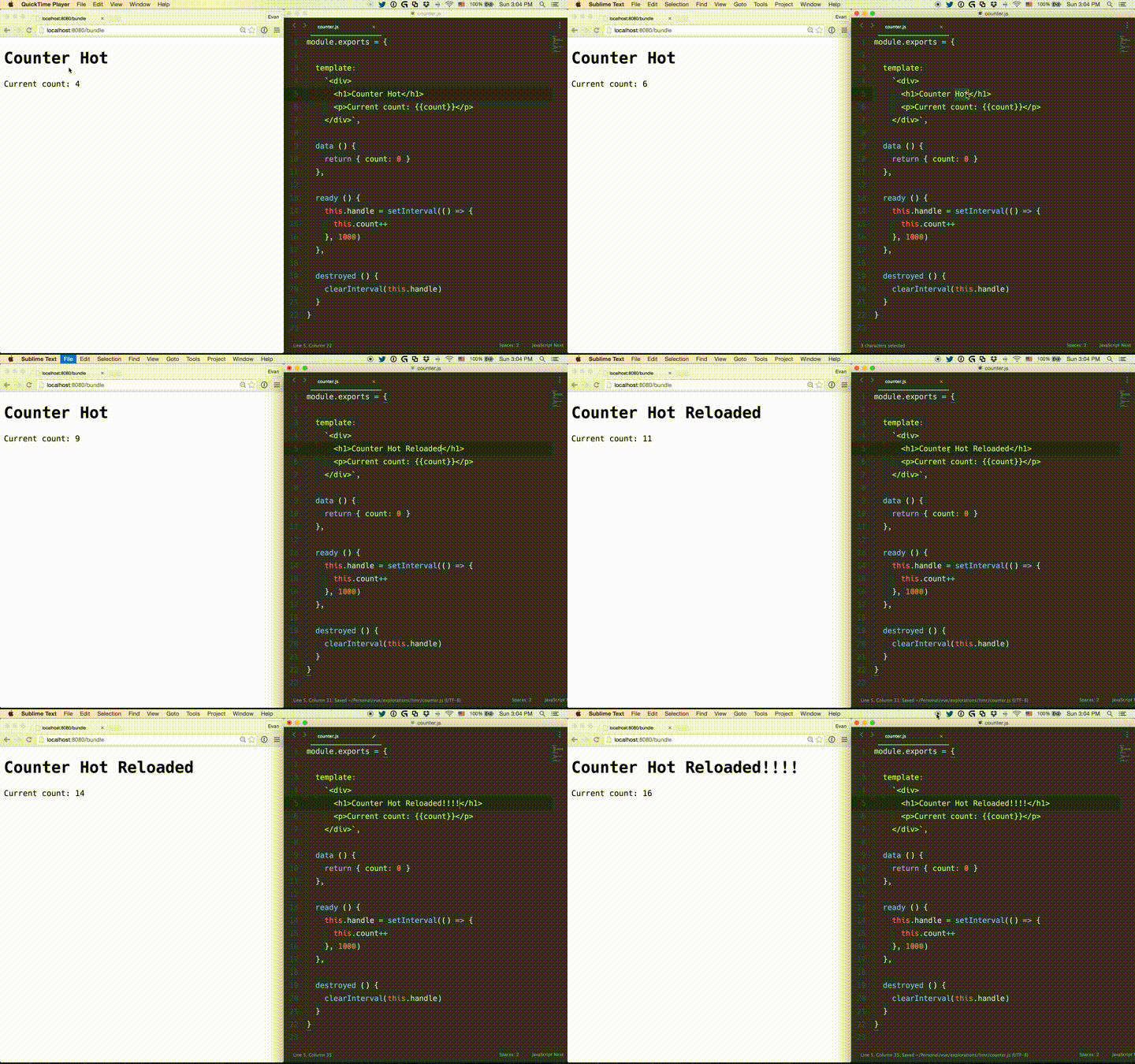
    <content type="html"><![CDATA[<p style="text-align:center"><img src="/images/logo.png" style="width:200px;display:inline-block"></p><p><a href="http://vuejs.org" target="_blank" rel="noopener">Vue.js</a> is a library for building web interfaces. Together with some other tools you can also call it a “framework”, although it’s more like a set of optional tools that work together really well. Now, if you’ve never heard of or used Vue before, you are probably thinking: great, yet another JavaScript framework! I get it. Turns out Vue isn’t particularly new — I first started working on its prototype almost two years ago, and the first public release was in <a href="http://blog.evanyou.me/2014/02/11/first-week-of-launching-an-oss-project/">February 2014</a>. Over the time it has been evolving, and today <a href="https://github.com/vuejs/awesome-vue#projects-using-vuejs" target="_blank" rel="noopener">many are using it in production</a>.</p><p>So, what exactly does Vue offer? What makes it different? Why in the world would you want to learn about it when there are already Angular, Ember and React? This post attempts to shed some light on these question by taking you through a brief tour of Vue.js concepts, and I hope you will have your own answers after reading it.</p><h2 id="Reactivity"><a href="#Reactivity" class="headerlink" title="Reactivity"></a>Reactivity</h2><blockquote><p>Keeping the state and the view in sync is hard. Or is it?</p></blockquote><p>Let’s start with the most basic task: displaying data. Suppose we have a simple object:</p><figure class="highlight js"><table><tr><td class="code"><pre><span class="line"><span class="keyword">var</span> object = &#123;</span><br><span class="line">  message: <span class="string">'Hello world!'</span></span><br><span class="line">&#125;</span><br></pre></td></tr></table></figure><p>And a template:</p><figure class="highlight html"><table><tr><td class="code"><pre><span class="line"><span class="tag">&lt;<span class="name">div</span> <span class="attr">id</span>=<span class="string">"example"</span>&gt;</span></span><br><span class="line">  &#123;&#123; message &#125;&#125;</span><br><span class="line"><span class="tag">&lt;/<span class="name">div</span>&gt;</span></span><br></pre></td></tr></table></figure><p>And here’s how we bind the data and the template together with Vue:</p><figure class="highlight js"><table><tr><td class="code"><pre><span class="line"><span class="keyword">new</span> Vue(&#123;</span><br><span class="line">  el: <span class="string">'#example'</span>,</span><br><span class="line">  data: object</span><br><span class="line">&#125;)</span><br></pre></td></tr></table></figure><p>Looks like we just rendered a template. What should we do to update the view when the object changes? The answer is… <em>nothing</em>. Vue has converted the object and made it “reactive”. When you set <code>object.message</code> to something else, the rendered HTML updates automatically. More importantly, there’s no need to worry about calling <code>$apply</code> in a timeout, or calling <code>setState()</code>, or listening to store events, or creating framework-proprietary observables like <code>ko.observable()</code> or <code>Ember.Object.create()</code>… it just works.</p><p>Vue also provides seamless computed properties:</p><figure class="highlight js"><table><tr><td class="code"><pre><span class="line"><span class="keyword">var</span> example = <span class="keyword">new</span> Vue(&#123;</span><br><span class="line">  data: &#123;</span><br><span class="line">    a: <span class="number">1</span></span><br><span class="line">  &#125;,</span><br><span class="line">  computed: &#123;</span><br><span class="line">    b: <span class="function"><span class="keyword">function</span> (<span class="params"></span>) </span>&#123;</span><br><span class="line">      <span class="keyword">return</span> <span class="keyword">this</span>.a + <span class="number">1</span></span><br><span class="line">    &#125;</span><br><span class="line">  &#125;</span><br><span class="line">&#125;)</span><br><span class="line"></span><br><span class="line"><span class="comment">// both a &amp; b are proxied on the created instance.</span></span><br><span class="line">example.a <span class="comment">// -&gt; 1</span></span><br><span class="line">example.b <span class="comment">// -&gt; 2</span></span><br><span class="line">example.a++</span><br><span class="line">example.b <span class="comment">// -&gt; 3</span></span><br></pre></td></tr></table></figure><p>The computed property <code>b</code> tracks <code>a</code> as a dependency, and is automatically kept in sync. No need to declare the dependencies yourself, because you shouldn’t have to.</p><p>In addition, POJO-based reactivity makes it trivially easy to integrate with any type of data-source or state management solutions. For example, here’s an integration that enables Vue.js components to bind to RxJS Observables with <a href="https://github.com/vuejs/vue-rx/blob/master/vue-rx.js#L22-L51" target="_blank" rel="noopener">less than 30 lines of code</a>.</p><h2 id="Components"><a href="#Components" class="headerlink" title="Components"></a>Components</h2><blockquote><p>Ok the data binding is neat for small demos. What about big apps?</p></blockquote><p>When it comes to structuring complex interfaces, Vue takes an approach that is very similar to React: it’s components all the way down. Let’s make our example a reusable component:</p><figure class="highlight js"><table><tr><td class="code"><pre><span class="line"><span class="keyword">var</span> Example = Vue.extend(&#123;</span><br><span class="line">  template: <span class="string">'&lt;div&gt;&#123;&#123; message &#125;&#125;&lt;/div&gt;'</span>,</span><br><span class="line">  data: <span class="function"><span class="keyword">function</span> (<span class="params"></span>) </span>&#123;</span><br><span class="line">    <span class="keyword">return</span> &#123;</span><br><span class="line">      message: <span class="string">'Hello Vue.js!'</span></span><br><span class="line">    &#125;</span><br><span class="line">  &#125;</span><br><span class="line">&#125;)</span><br><span class="line"></span><br><span class="line"><span class="comment">// register it with the tag &lt;example&gt;</span></span><br><span class="line">Vue.component(<span class="string">'example'</span>, Example)</span><br></pre></td></tr></table></figure><p>Now we can use the component in other templates simply as a custom element:</p><figure class="highlight html"><table><tr><td class="code"><pre><span class="line"><span class="tag">&lt;<span class="name">example</span>&gt;</span><span class="tag">&lt;/<span class="name">example</span>&gt;</span></span><br></pre></td></tr></table></figure><p>Components can contain other components, and they form a tree that represents your UI. To make them actually composable, Vue components can also:</p><ul><li>Define how it expects to receive data from its parent using <code>props</code>;</li><li>Emit custom events to trigger actions in parent scope;</li><li>Compose parent injected content with its own template using <code>&lt;slot&gt;</code>.</li></ul><p>We are not going to go into the details here, but if you are interested, checkout more in the <a href="http://vuejs.org/guide/components.html" target="_blank" rel="noopener">official guide</a>.</p><h2 id="Modularity"><a href="#Modularity" class="headerlink" title="Modularity"></a>Modularity</h2><blockquote><p>It’s 2015 and we shouldn’t put everything in the global scope!</p></blockquote><p>Let’s use a module bundler (<a href="http://webpack.github.io/" target="_blank" rel="noopener">Webpack</a> or <a href="http://browserify.org/" target="_blank" rel="noopener">Browserify</a>) and use ES2015. Each component can just be in its own module. Since Vue will automatically convert option objects into component constructors, we can simply export an object:</p><figure class="highlight js"><table><tr><td class="code"><pre><span class="line"><span class="comment">// ComponentA.js</span></span><br><span class="line"><span class="keyword">export</span> <span class="keyword">default</span> &#123;</span><br><span class="line">  template: <span class="string">'&lt;div&gt;&#123;&#123; message &#125;&#125;&lt;/div&gt;'</span>,</span><br><span class="line">  data () &#123;</span><br><span class="line">    <span class="keyword">return</span> &#123;</span><br><span class="line">      message: <span class="string">'Hello Vue.js!'</span></span><br><span class="line">    &#125;</span><br><span class="line">  &#125;</span><br><span class="line">&#125;</span><br></pre></td></tr></table></figure><figure class="highlight js"><table><tr><td class="code"><pre><span class="line"><span class="comment">// App.js</span></span><br><span class="line"><span class="keyword">import</span> ComponentA <span class="keyword">from</span> <span class="string">'./ComponentA'</span></span><br><span class="line"></span><br><span class="line"><span class="keyword">export</span> <span class="keyword">default</span> &#123;</span><br><span class="line">  <span class="comment">// use another component, in this scope only.</span></span><br><span class="line">  <span class="comment">// ComponentA maps to the tag &lt;component-a&gt;</span></span><br><span class="line">  components: &#123; ComponentA &#125;,</span><br><span class="line">  template: <span class="string">`</span></span><br><span class="line"><span class="string">    &lt;div&gt;</span></span><br><span class="line"><span class="string">      &lt;p&gt;Now I'm using another component.&lt;/p&gt;</span></span><br><span class="line"><span class="string">      &lt;component-a&gt;&lt;/component-a&gt;</span></span><br><span class="line"><span class="string">    &lt;/div&gt;</span></span><br><span class="line"><span class="string">  `</span></span><br><span class="line">&#125;</span><br></pre></td></tr></table></figure><p>Pretty nice, huh? Wouldn’t it be even better if we can encapsulate a component’s template, styles and JavaScript logic in the same file, and getting proper syntax highlighting for each? With tools like Webpack + <a href="https://github.com/vuejs/vue-loader" target="_blank" rel="noopener">vue-loader</a> or Browserify + <a href="https://github.com/vuejs/vueify" target="_blank" rel="noopener">vueify</a>, you can:</p><figure class="highlight html"><table><tr><td class="code"><pre><span class="line"><span class="comment">&lt;!-- MyComponent.vue --&gt;</span></span><br><span class="line"></span><br><span class="line"><span class="comment">&lt;!-- css --&gt;</span></span><br><span class="line"><span class="tag">&lt;<span class="name">style</span>&gt;</span><span class="undefined"></span></span><br><span class="line"><span class="undefined">.message &#123;</span></span><br><span class="line"><span class="undefined">  color: red;</span></span><br><span class="line"><span class="undefined">&#125;</span></span><br><span class="line"><span class="undefined"></span><span class="tag">&lt;/<span class="name">style</span>&gt;</span></span><br><span class="line"></span><br><span class="line"><span class="comment">&lt;!-- template --&gt;</span></span><br><span class="line"><span class="tag">&lt;<span class="name">template</span>&gt;</span></span><br><span class="line">  <span class="tag">&lt;<span class="name">div</span> <span class="attr">class</span>=<span class="string">"message"</span>&gt;</span>&#123;&#123; message &#125;&#125;<span class="tag">&lt;/<span class="name">div</span>&gt;</span></span><br><span class="line"><span class="tag">&lt;/<span class="name">template</span>&gt;</span></span><br><span class="line"></span><br><span class="line"><span class="comment">&lt;!-- js --&gt;</span></span><br><span class="line"><span class="tag">&lt;<span class="name">script</span>&gt;</span><span class="undefined"></span></span><br><span class="line"><span class="javascript"><span class="keyword">export</span> <span class="keyword">default</span> &#123;</span></span><br><span class="line"><span class="javascript">  props: [<span class="string">'message'</span>],</span></span><br><span class="line"><span class="undefined">  created() &#123;</span></span><br><span class="line"><span class="javascript">    <span class="built_in">console</span>.log(<span class="string">'MyComponent created!'</span>)</span></span><br><span class="line"><span class="undefined">  &#125;</span></span><br><span class="line"><span class="undefined">&#125;</span></span><br><span class="line"><span class="undefined"></span><span class="tag">&lt;/<span class="name">script</span>&gt;</span></span><br></pre></td></tr></table></figure><blockquote><p>Wait a minute, did we just re-invent Web Components? But your CSS is still global!</p></blockquote><p>Well, sort of, except:</p><ul><li><p>You <em>can</em> have style encapsulation. Just add a <code>scoped</code> attribute to the <code>&lt;style&gt;</code> tag. And it does <em>not</em> leak down to nested child components.</p></li><li><p>Each Vue component is compiled into a JavaScript module, and doesn’t need any polyfill to work all the way down to IE9. You can also wrap it inside a real Custom Element if you want.</p></li><li><p>ES2015 is supported by default in <code>&lt;script&gt;</code> tags.</p></li><li><p>You can use <em>any pre-processor</em> you want in each language block.</p></li><li><p>When using Webpack + vue-loader, you also get to leverage Webpack’s full power for static asset handling, because the template and styles are piped through <code>html-loader</code> and <code>css-loader</code> that can handle asset URLs as module dependencies.</p></li></ul><p>So yeah, if you want you can have components that look like this:</p><p><img src="/images/vue-component.png" alt="vue component"></p><p>Oh, and did I mention Vue components are hot-reloadable?</p><p><img src="/images/vue-hot.gif" alt="vue hot reload"></p><h2 id="Animations"><a href="#Animations" class="headerlink" title="Animations"></a>Animations</h2><blockquote><p>Can I make fancy stuff with it?</p></blockquote><p>Vue ships with a built-in <a href="http://vuejs.org/guide/transitions.html" target="_blank" rel="noopener">transition system</a> that is very simple to use. There are many <a href="https://github.com/vuejs/awesome-vue#interactive-experiences" target="_blank" rel="noopener">award-winning interactive sites</a> built with it.</p><p>Vue’s reactivity system also makes it trivially simple to do efficient state-based tweening, which turns out to be quite a hassle in frameworks that use dirty-checking or Virtual DOM diffing. When you tween a piece of state at 60 frames per second, Vue accurately knows which bindings are affected, so it efficiently updates the affected bindings, and the rest of the app is unaffected. In both dirty checking and Virtual DOM diffing, changing a piece of state means the whole affected sub-tree (be it scopes or components) needs to be digested/re-rendered. Although it is usually “fast enough” in small demos, it most likely won’t be when you are triggering changes 60 times per second in a large app. Even if it manages to be fast enough, it will be draining device battery for all the wasted cycles. Check out <a href="https://www.youtube.com/watch?v=xtqUJVqpKNo" target="_blank" rel="noopener">this talk</a> to get a sense how much effort is needed to animate things efficiently in React. Vue apps are just optimized by default in these scenarios.</p><p>An example of state-based tweening with Vue:</p><p></p><p data-height="428" data-theme-id="0" data-slug-hash="XmZNOG" data-default-tab="result" data-user="yyx990803" class="codepen">See the Pen <a href="http://codepen.io/yyx990803/pen/XmZNOG/" target="_blank" rel="noopener">Vue.js elastic header component</a> by Evan You (<a href="http://codepen.io/yyx990803" target="_blank" rel="noopener">@yyx990803</a>) on <a href="http://codepen.io" target="_blank" rel="noopener">CodePen</a>.</p><p></p><script async src="//assets.codepen.io/assets/embed/ei.js"></script><h2 id="Routing"><a href="#Routing" class="headerlink" title="Routing"></a>Routing</h2><blockquote><p>So I want to build an app, but where’s the router?</p></blockquote><p>Like React, Vue itself doesn’t come with routing. But there’s the <a href="https://github.com/vuejs/vue-router" target="_blank" rel="noopener">vue-router</a> package to help you out. It supports mapping nested routes to nested components and offers fine-grained transition control. Here’s a simple example:</p><figure class="highlight js"><table><tr><td class="code"><pre><span class="line"><span class="keyword">import</span> Vue <span class="keyword">from</span> <span class="string">'vue'</span></span><br><span class="line"><span class="keyword">import</span> VueRouter <span class="keyword">from</span> <span class="string">'vue-router'</span></span><br><span class="line"><span class="keyword">import</span> App <span class="keyword">from</span> <span class="string">'./app.vue'</span></span><br><span class="line"><span class="keyword">import</span> ViewA <span class="keyword">from</span> <span class="string">'./view-a.vue'</span></span><br><span class="line"><span class="keyword">import</span> ViewB <span class="keyword">from</span> <span class="string">'./view-b.vue'</span></span><br><span class="line"></span><br><span class="line">Vue.use(VueRouter)</span><br><span class="line"></span><br><span class="line"><span class="keyword">const</span> router = <span class="keyword">new</span> VueRouter()</span><br><span class="line"></span><br><span class="line">router.map(&#123;</span><br><span class="line">  <span class="string">'/a'</span>: &#123; <span class="attr">component</span>: ViewA &#125;,</span><br><span class="line">  <span class="string">'/b'</span>: &#123; <span class="attr">component</span>: ViewB &#125;</span><br><span class="line">&#125;)</span><br><span class="line"></span><br><span class="line">router.start(App, <span class="string">'#app'</span>)</span><br></pre></td></tr></table></figure><p>The template for <code>app.vue</code>:</p><figure class="highlight html"><table><tr><td class="code"><pre><span class="line"><span class="tag">&lt;<span class="name">div</span>&gt;</span></span><br><span class="line">  <span class="tag">&lt;<span class="name">h1</span>&gt;</span>This is the layout that won't change<span class="tag">&lt;/<span class="name">h1</span>&gt;</span></span><br><span class="line">  <span class="tag">&lt;<span class="name">router-view</span>&gt;</span><span class="comment">&lt;!-- matched component renders here --&gt;</span><span class="tag">&lt;/<span class="name">router-view</span>&gt;</span></span><br><span class="line"><span class="tag">&lt;/<span class="name">div</span>&gt;</span></span><br></pre></td></tr></table></figure><p>For an actual example, check out this <a href="https://github.com/vuejs/vue-hackernews" target="_blank" rel="noopener">HackerNews Clone</a> built with Vue.js, vue-router, Webpack and vue-loader.</p><h2 id="Stability"><a href="#Stability" class="headerlink" title="Stability"></a>Stability</h2><blockquote><p>A personal project? Seriously?</p></blockquote><p>Yes, this is a personal project. So if you are looking for an enterprise backed dev team, Vue is probably not the one. But I’d rather look at the numbers. Vue has maintained <a href="https://codecov.io/github/vuejs/vue?branch=master" target="_blank" rel="noopener">100% test coverage</a> on every single commit since the 0.11 rewrite, and that will continue. GitHub issues are closed within <a href="http://issuestats.com/github/vuejs/vue" target="_blank" rel="noopener">an average of 13 hours</a>, and there has been 1400+ of them. As of this writing, there are literally <em>zero</em> open and reproducible bugs.</p><p>Vue just recently <a href="http://vuejs.org/2015/10/26/1.0.0-release/" target="_blank" rel="noopener">reached 1.0</a>, which means it’s production ready. The API is going to stay stable. For the 0.12 -&gt; 1.0 upgrade, there is a migration build which ships with all the new features while remaining fully backwards compatible. The deprecation warnings will essentially guide users through the upgrade process. And that is going to be the case for any future breaking releases as well.</p><p>Well, I hope I’ve convinced at least some of you to take a deeper look at Vue. I believe it provides a valuable alternative to what’s out there, and I’d love to see you build some great stuff with it. Feel free to check out the <a href="http://vuejs.org" target="_blank" rel="noopener">docs</a>, or come hangout in the <a href="http://forum.vuejs.org/" target="_blank" rel="noopener">forum</a> and <a href="https://gitter.im/vuejs/vue" target="_blank" rel="noopener">gitter channel</a>. Oh, and even if you don’t want to use Vue, you should <a href="https://twitter.com/youyuxi" target="_blank" rel="noopener">follow me on Twitter</a>.</p>]]></content>
    
    <summary type="html">


        &lt;p style=&quot;text-align:center&quot;&gt;&lt;img src=&quot;/images/logo.png&quot; style=&quot;width:200px;display:inline-block&quot;&gt;&lt;/p&gt;

&lt;p&gt;&lt;a href=&quot;http://vuejs.org&quot; target
      
    
    </summary>
    
    
  </entry>
  
  <entry>
    <title>First Week of Launching Vue.js</title>
    <link href="http://blog.evanyou.me/2014/02/11/first-week-of-launching-an-oss-project/"/>
    <id>http://blog.evanyou.me/2014/02/11/first-week-of-launching-an-oss-project/</id>
    <published>2014-02-11T21:51:12.000Z</published>
    <updated>2018-12-27T20:27:37.962Z</updated>
    
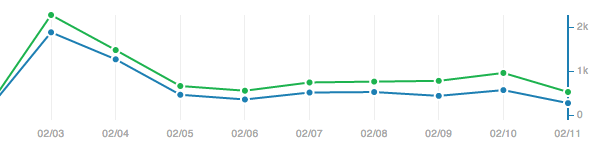
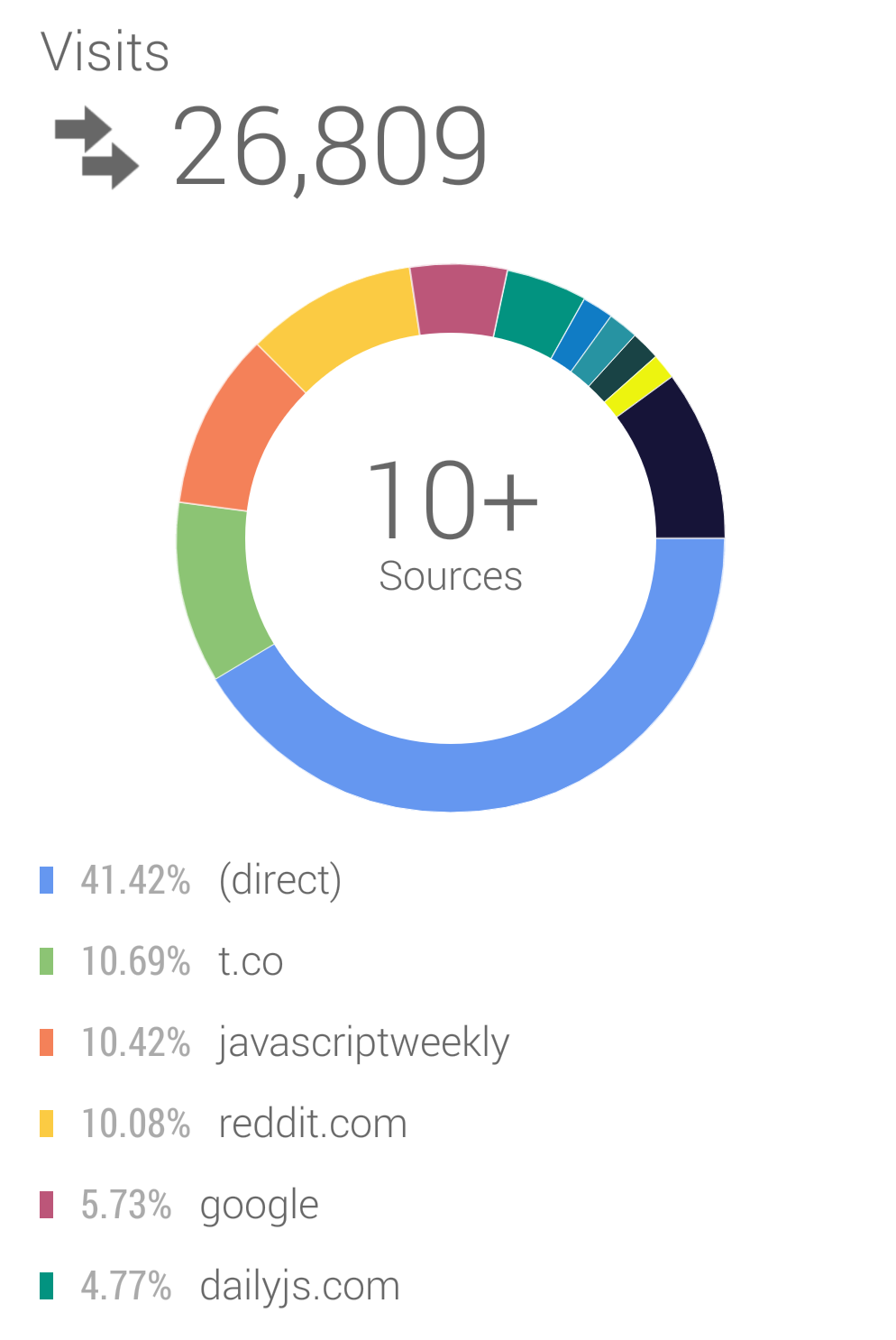
    <content type="html"><![CDATA[<p><img src="/images/stats.png" alt="GitHub visitors graph"></p><p>I just launched an open source project that I’ve been working on for quite some time: Vue.js. It’s a library for building web interfaces using MVVM data bindings with a very simple API. If that sounds interesting to you, you can check out more details at <a href="http://vuejs.org" target="_blank" rel="noopener">vuejs.org</a> and the <a href="https://github.com/yyx990803/vue" target="_blank" rel="noopener">GitHub repo</a>. The motivation and reasoning behind the library is probably best explained in a separate post - this post is mostly about the personal experience of my first serious attempt at building, launching, marketing and maintaining an open source project.</p><h2 id="Before-Launch-Preparations"><a href="#Before-Launch-Preparations" class="headerlink" title="Before Launch Preparations"></a>Before Launch Preparations</h2><h3 id="Marketing-Plan"><a href="#Marketing-Plan" class="headerlink" title="Marketing Plan"></a>Marketing Plan</h3><p>Almost two years ago I <a href="https://vimeo.com/37182785" target="_blank" rel="noopener">recreated the Clear iOS app with HTML5</a> and it enjoyed a decent level of PR success. It all happened without a plan though: I hacked the rough initial version in 2 days, posted a video on Vimeo, and then tweeted at the guys who made the original app. It was not really a serious open source project, more like a shoot-and-forget demo. Then the next day it showed up on HackerNews front page and I got blasted by emails.</p><p>Now that I think about it, the reason it worked was because native-like HTML5 interface was still new to a lot of people back in 2012. But this time it’s totally different. The JavaScript MV* space is totally over-saturated as of now. Although I do believe Vue.js offers something unique to the table, it can be a challenge to convince people to even give it a try. To cope with that I would need to actively promote the project instead of waiting for things to happen. The Mozilla blog had an <a href="https://hacks.mozilla.org/2013/05/how-to-spread-the-word-about-your-code/?utm_source=statuscode&amp;utm_medium=email" target="_blank" rel="noopener">excellent post</a> on this topic. For my project specifically, I prioritized these channels:</p><ul><li>HackerNews</li><li>Reddit /r/javascript</li><li>EchoJS</li><li>The DailyJS blog</li><li>JavaScript Weekly</li><li>Maintain a project Twitter account</li></ul><p>The details of these channel’s respective impact will be talked about later in this post.</p><h3 id="Website-and-Documentation"><a href="#Website-and-Documentation" class="headerlink" title="Website and Documentation"></a>Website and Documentation</h3><p>The website is built with <a href="http://zespia.tw/hexo/" target="_blank" rel="noopener">Hexo</a>, a nice static site generator which is essentially Jekyll in Node.js. This allows me to write documentations and guides in Markdown while retaining full control over the site - including visual design and embedding examples. The documentation is written separately in Markdown because personally for me writing all the docs in source comments hurts code readability quite a bit. The site is hosted on GitHub pages. It is also <a href="https://github.com/vuejs/vuejs.org" target="_blank" rel="noopener">open sourced</a> so users can contribute to the contents. One day after launch I got <a href="https://github.com/vuejs/vuejs.org/pull/3/files" target="_blank" rel="noopener">a pull request fixing Bruce Lee’s email address</a>. You see, open source is awesome.</p><h3 id="Tests"><a href="#Tests" class="headerlink" title="Tests"></a>Tests</h3><p>There’s no way people would use an MV* library without decent test coverage, so for Vue.js a comprehensive test suite is a must. It was fun and exciting when I was hacking away in the beginning, but when the internal architecture stablized I knew I had to start writing tests. I started running Mocha unit tests in a headless PhantomJS instance with <code>grunt-mocha</code>. After the API matured a bit, I added functional test cases with CasperJS, and later on switched the unit test runner to Karma so I can automatically run unit tests in real browsers (which is awesome). The code currently has a 96% coverage.Shortly before launch I configured the unit tests to be also run on SauceLabs in all target browsers to ensure compatibility. Gotta have those shiny <code>build: passing</code> badges in the README!</p><h2 id="The-Week-After-Launch"><a href="#The-Week-After-Launch" class="headerlink" title="The Week After Launch"></a>The Week After Launch</h2><h3 id="Day-1"><a href="#Day-1" class="headerlink" title="Day 1"></a>Day 1</h3><p><strong>Stats:</strong></p><ul><li>Vuejs.org unique visits: 10245</li><li>GitHub Stars: 212 (+181)</li><li>GitHub unique visits: 1880</li><li>Star Rate: 9.6%</li></ul><p><strong>Exposure:</strong></p><ul><li>HackerNews front page</li><li>Reddit <em>/r/javascript</em> top spot</li><li>EchoJS top spot</li></ul><p>I submitted the website link to HackerNews, EchoJS and the <em>/r/javascript</em> Sub Reddit on Sunday Feb 2nd, in the late evening, because I just finished writing the documentation. Had I done enough research, I would have realized it was probably <a href="http://nathanael.hevenet.com/the-best-time-to-post-on-hacker-news-a-comprehensive-answer/" target="_blank" rel="noopener">one of the worst time choices to submit links</a>. Luckily, the HackNews submission still made the front page and stayed on it for quite a few hours. The EchoJS and <em>/r/javascript</em> submission both climbed to the top spot, both very encouraging signs. The peak visits/hour was at 9AM Monday, which falls in line with the analysis in the previous linked post. Based on Google Analytics data from now (Feb.11th), about <strong>41.42%</strong> of the traffic were identified as direct visit, among which a large portion probably came from HN. Reddit accounts for <strong>10.08%</strong>, and EchoJS only <strong>1.81%</strong>.</p><p>Despite over 10k unique visits to the website in Day 1, the repo only got 1.8k visits. Compared with the following days this is a particularly low conversion ratio. The possible cause was that when the site was first launched, the examples section only had three text links with source directly linked to GitHub. Even worse, the front page also had no code example at all. Google Analytics data shows that among all the visitors that stayed after landing at the home page, <strong>nearly 50% visited the examples page next.</strong> I think having interactive examples like the current <a href="http://vuejs.org/examples/" target="_blank" rel="noopener">jsfiddle embeds</a> would probably help visitors grasp the gist of the library much better.</p><h3 id="Day-2"><a href="#Day-2" class="headerlink" title="Day 2"></a>Day 2</h3><p><strong>Stats:</strong></p><ul><li>Vuejs.org unique visits: 2892</li><li>GitHub Stars: 382 (+170)</li><li>GitHub unique visits: 1266</li><li>Star Rate: 13.4%</li></ul><p><strong>Exposure:</strong> Featured on <a href="http://dailyjs.com/2014/02/03/vuejs-beautify/" target="_blank" rel="noopener"><em>DailyJS</em></a> blog.</p><p>I submitted Vue.js to DailyJS on Day 1 and it was featured on Day 2. The aqcuisition stats up to today show that DailyJS made up for around <strong>4.77%</strong> of total website visits. It is worth noting that visitors acquired from DailyJS had the highest pages/visit (4.64) and the lowest bounce rate (17.01%) among all referral sources. DailyJS also generated 500+ unique visits directly to the GitHub repo, which is the highest referral count except for the Vue.js site and GitHub itself. Day 2 also had the highest GitHub visit/star rate so far.</p><h3 id="Day3"><a href="#Day3" class="headerlink" title="Day3"></a>Day3</h3><p><strong>Stats:</strong></p><ul><li>Vuejs.org unique visits: 1257</li><li>GitHub Stars: 420 (+38)</li><li>GitHub unique visits: 455</li><li>Star Rate: 8.3%</li></ul><p>There was nothing too exciting on Day 3. I reached out to a few more sources including the Changelog, Smashing Magazine and Peter Cooper (<a href="https://twitter.com/peterc" target="_blank" rel="noopener">@peterc</a>, curator of the JavaScript Weekly newsletter). The Changelog agreed to cover the library but nothing happend so far. Smashing Magazine made no response. Peter responded that they’ve already queued Vue.js for the week.</p><h3 id="Day4"><a href="#Day4" class="headerlink" title="Day4"></a>Day4</h3><p><strong>Stats:</strong></p><ul><li>Vuejs.org unique visits: 1512</li><li>GitHub Stars: 459 （+39）</li><li>GitHub unique visits: 330</li><li>Star Rate: 11.8%</li></ul><p><strong>Exposure:</strong> Tweeted by <a href="https://twitter.com/JavaScriptDaily" target="_blank" rel="noopener">@JavaScriptDaily</a>.</p><p>Day 4 @JavaScriptDaily (49.6k followers) tweeted about Vue.js. By this time, Vue.js have had a fair amount of retweets about it, and for all time data Twitter referrals account for about <strong>10.69%</strong> of total visists. However, Twitter visitors had a whopping 55.28% bounce rate and only 2.72 pages/visit, lowest among top 10 referral sources.</p><h3 id="Day5"><a href="#Day5" class="headerlink" title="Day5"></a>Day5</h3><p><strong>Exposure:</strong></p><ul><li>Featured in <em>JavaScript Weekly</em> email newsletter.</li><li>Vue.js TodoMVC benchmark on <em>/r/javascript</em> front page</li></ul><p><strong>Stats:</strong></p><ul><li>Vuejs.org unique visits: 2825</li><li>GitHub Stars: 518 (+59)</li><li>GitHub Unique Visits: 495</li><li>Star Rate: 11.9%</li></ul><p>The <a href="http://javascriptweekly.com/" target="_blank" rel="noopener">JavaScript Weekly</a> newsletter has a really large audience (&gt;65k subscribers). So far referrals identified from JavaScript Weekly account for <strong>10.42%</strong> of the traffic, the highest among all referral sources. (It is a bit puzzling because it doesn’t show up in the web version of Google Analytics but is included in the Android version.) As a result the falling site visits and GitHub star count saw a decent comeback on Day 5.</p><p>As expected, the <a href="http://vuejs.org/perf" target="_blank" rel="noopener">TodoMVC benchmark</a> stirred up some controversy. People love and hate benchmarks - it all depends on whether the results fit their expectations. Having said that, I readily admit these benchmarks do not reflect the whole picture (in fact a very limited case) and should be taken with a grain of salt.</p><h3 id="Day6"><a href="#Day6" class="headerlink" title="Day6"></a>Day6</h3><p><strong>Exposure:</strong> Landed in <a href="http://todomvc.com" target="_blank" rel="noopener">TodoMVC</a> and retweeted by @tastejs.</p><p><strong>Stats:</strong></p><ul><li>Vuejs.org unique visits: 1826</li><li>GitHub Stars: 581 (+63)</li><li>GitHub Unique Visits: 552</li><li>Star Rate: 11.4%</li></ul><p>Day 6 is pretty exciting because Vue.js landed in TodoMVC. I actually submitted the pull request on Day 1, but it took a week to finally get merged in. I implemented TodoMVC with Vue.js very early on as a testbed for designing the API, and had a pretty comprehensive CasperJS test suite for it that was run on every commit. Interestingly, when I submitted my pull request, the TodoMVC team had just started screening submissions with an automated WebDriver test suite. Thanks to the CasperJS tests it didn’t take me much time to pass all their tests.</p><p>I haven’t found a way to quantify the implication of being included in TodoMVC, but based on the traffic it’s not too dramatic. Nonetheless, this is a really good testimonial for the competence and value of Vue.js, considering it was accepted right after the TodoMVC team wrote a post on <a href="http://blog.tastejs.com/yet-another-framework-syndrome-yafs" target="_blank" rel="noopener">Yet Another Framework Syndrome</a>.</p><h3 id="Day7"><a href="#Day7" class="headerlink" title="Day7"></a>Day7</h3><ul><li>Vuejs.org unique visits: 1529</li><li>GitHub Stars: 615 (+34)</li><li>GitHub Unique Visits: 399</li><li>Star Rate: 8.5%</li></ul><p>Sunday everything slowed down, which is likely a natural weekly pattern. What’s exciting though is that Vue.js merged the first pull request from the community. In fact, three pull requests were merged or partially included on Day 7. People have also started to hang around in the #vuejs IRC channel, discuss issues and ask questions. There’s certainly some momentum going on :)</p><h2 id="Acquisition-Stats-as-of-Feb-11th"><a href="#Acquisition-Stats-as-of-Feb-11th" class="headerlink" title="Acquisition Stats as of Feb 11th"></a>Acquisition Stats as of Feb 11th</h2><p style="text-align:center;padding:30px 0 40px"><img src="/images/sources.png" style="width:497px;display:inline-block"></p><h2 id="Now"><a href="#Now" class="headerlink" title="Now"></a>Now</h2><p>Since I released Vue.js I have received kind words and suggestions from many people. Considering the current state the JavaScript MV* scene, the reception has been well beyond my expectation. To all of those who like it, I want to say thank you. And finally, thank <strong>YOU</strong> for reading this far. If you made it here, I assume you are somewhat interested in Vue.js - so checkout the site at <a href="http://vuejs.org" target="_blank" rel="noopener">vuejs.org</a>, get in touch via <a href="https://twitter.com/vuejs" target="_blank" rel="noopener">@vuejs</a>, or even better, contribute on <a href="https://github.com/yyx990803/vue" target="_blank" rel="noopener">GitHub</a>.</p>]]></content>
    
    <summary type="html">


        &lt;p&gt;&lt;img src=&quot;/images/stats.png&quot; alt=&quot;GitHub visitors graph&quot;&gt;&lt;/p&gt;
&lt;p&gt;I just launched an open source project that I’ve been working on for qui
      
    
    </summary>
    
    
  </entry>
  
  <entry>
    <title>DOM Composition Events compatibility notes</title>
    <link href="http://blog.evanyou.me/2014/01/03/composition-event/"/>
    <id>http://blog.evanyou.me/2014/01/03/composition-event/</id>
    <published>2014-01-03T11:49:42.000Z</published>
    <updated>2018-12-27T20:27:37.962Z</updated>
    
    <content type="html"><![CDATA[<p style="text-align:center;padding:30px 0 40px"><img src="/images/composition.png" style="width:374px;display:inline-block"></p><p>If you don’t frequently type in a non-latin language, e.g. Chinese, then most likely you’ve never heard of <a href="https://developer.mozilla.org/en-US/docs/Web/API/CompositionEvent" target="_blank" rel="noopener">Composition Events</a>. Even for a Chinese developer, it’s rare that these events are needed in development. In fact I didn’t learn about their existence until recently, when I was trying to alter an input field’s value as the user types. Everything works perfectly when typing English letters, but it turns into a mess when I tried Chinese. Let me explain.</p><p>The way IME composition works is that it buffers the user’s keystrokes until a character/word selection has been made, finalizing the input. The buffered keystrokes are temporarily displayed, but not actually inserted into the DOM. However, when I change the input field’s value during a composition, the composition gets terminated early and these buffered keystrokes get inserted into the input field.</p><p>As I was banging my head against the wall trying to find a solution using key events and async updates, I discovered composition events. They are exactly what I need! But not before I get bitten by the various inconsistencies across major browsers. According to the <a href="https://dvcs.w3.org/hg/dom3events/raw-file/tip/html/DOM3-Events.html#event-type-compositionstart" target="_blank" rel="noopener">spec</a>, this is the expected behvaior:</p><ul><li>fire <code>compositionstart</code> when composition starts.</li><li>fire <code>compositionend</code> when user selects a character/word and finalizes the input.</li><li>fire <code>compositionupdate</code> on every input during composition, including immediately after the start event and immediately before the end event.</li><li><code>input</code> events should fire after composition events</li></ul><p>What’s actually implemented in major mordern browsers:</p><ul><li><strong>Firefox 26</strong> : working according to the spec.</li><li><strong>Chrome 31 / Safari 7</strong> : doesn’t fire <code>compositionupdate</code> immediately after the start event or before the end event. For <code>compositionstart</code>, the event’s <code>data</code> value is wrong (<code>undefined</code> where an empty string is expected).</li><li><strong>IE10</strong> : fires only one <code>compositionupdate</code> right after <code>compositionstart</code>, then no more.</li><li><strong>IE9</strong> : fires <code>input</code> before composition events.</li></ul><p>Pretty annoying, but luckily not too complicated to work around with for my case. All I had to do was listening for <code>compositionstart</code> and <code>compositionend</code> and avoid changing the input field’s value during the whole composition - and voila, problem solved!</p>]]></content>
    
    <summary type="html">


        &lt;p style=&quot;text-align:center;padding:30px 0 40px&quot;&gt;&lt;img src=&quot;/images/composition.png&quot; style=&quot;width:374px;display:inline-block&quot;&gt;&lt;/p&gt;

&lt;p&gt;If you
      
    
    </summary>
    
    
  </entry>
  
  <entry>
    <title>Gulp-style stream piping in Grunt, or anywhere else</title>
    <link href="http://blog.evanyou.me/2013/12/29/gulp-piping/"/>
    <id>http://blog.evanyou.me/2013/12/29/gulp-piping/</id>
    <published>2013-12-29T16:39:52.000Z</published>
    <updated>2018-12-27T20:27:37.962Z</updated>
    
    <content type="html"><![CDATA[<p style="text-align:center"><img src="/images/gulp.png" style="width:98px;display:inline-block"></p><p>Recently a new front-end build tool, <a href="http://gulpjs.com" target="_blank" rel="noopener">Gulp</a>, has been getting quite some attention. What makes it really elegant is its use of Streams to orchestrate the build flow. Since everything is passed down in the buffer, it gets rid of the need to create temporary on-disk files.</p><p>It already has an active community contributing plugins for it, but still lacking a few plugins that I need for testing purposes, so I have to stick with Grunt for now. I can of course use Gulp and Grunt side by side, but I really don’t want two build systems in a single project. The other problem I have with Gulp is its task concurrency model. Everything runs in parallel by default and it’s a bit awkward when you simply want to have a list of tasks to run in order (which Grunt does by default).</p><p>Luckily, one of the authors of Gulp has refactored gulp’s file system out of its core as a standalone module: <a href="https://github.com/wearefractal/vinyl-fs" target="_blank" rel="noopener">vinyl-fs</a>. Its <code>.src()</code> and <code>.dest()</code> methods are actually all you need to leverage existing Gulp plugins. The module is not in npm yet as of this writing, but you can install it using its github shorthand:</p><figure class="highlight bash"><table><tr><td class="code"><pre><span class="line">$ npm install wearefractal/vinyl-fs</span><br></pre></td></tr></table></figure><p>With <code>vinyl-fs</code> we can easily use Gulp plugins inside Grunt tasks:</p><figure class="highlight js"><table><tr><td class="code"><pre><span class="line"><span class="keyword">var</span> fs = <span class="built_in">require</span>(<span class="string">'vinyl-fs'</span>),</span><br><span class="line">    gzip = <span class="built_in">require</span>(<span class="string">'gulp-gzip'</span>)</span><br><span class="line"></span><br><span class="line">grunt.registerTask(<span class="string">'zip'</span>, <span class="function"><span class="keyword">function</span> (<span class="params"></span>) </span>&#123;</span><br><span class="line">  fs.src(<span class="string">'./build/build.js'</span>)</span><br><span class="line">    .pipe(gzip())</span><br><span class="line">    .pipe(fs.dest(<span class="string">'./build'</span>))</span><br><span class="line">    .on(<span class="string">'end'</span>, <span class="keyword">this</span>.async())</span><br><span class="line">&#125;)</span><br></pre></td></tr></table></figure><p>You might have noticed that some Gulp plugins really just do one trivial thing, like renaming, adding a header, adding a footer, etc. I’m okay with these tiny extra dependencies, but what annoys me a little bit is the fact that almost all of these plugins have the entire <a href="https://github.com/dominictarr/event-stream" target="_blank" rel="noopener">event-stream</a> module as a dependency but really only uses its .map() function, which is available as the standalone <a href="https://github.com/dominictarr/map-stream" target="_blank" rel="noopener">map-stream</a> module. Also, what if I want to do something to the file that doesn’t have a plugin for?</p><p>It’s in fact super easy to hand-roll some of these functionalities with just <code>map-stream</code>:</p><figure class="highlight js"><table><tr><td class="code"><pre><span class="line"><span class="keyword">var</span> fs = <span class="built_in">require</span>(<span class="string">'vinyl-fs'</span>),</span><br><span class="line">    map = <span class="built_in">require</span>(<span class="string">'map-stream'</span>),</span><br><span class="line">    zlib = <span class="built_in">require</span>(<span class="string">'zlib'</span>)</span><br><span class="line">grunt.registerTask(<span class="string">'zip'</span>, <span class="function"><span class="keyword">function</span> (<span class="params"></span>) </span>&#123;</span><br><span class="line">  fs.src(<span class="string">'./build/build.js'</span>)</span><br><span class="line">    .pipe(map(gzip))</span><br><span class="line">    .pipe(fs.dest(<span class="string">'./build'</span>))</span><br><span class="line">    .on(<span class="string">'end'</span>, <span class="keyword">this</span>.async())</span><br><span class="line">&#125;)</span><br><span class="line"><span class="comment">// all you need to do is modify the file's</span></span><br><span class="line"><span class="comment">// contents and then call the callback.</span></span><br><span class="line"><span class="comment">// Just remember it's always buffer in and buffer out.</span></span><br><span class="line"><span class="function"><span class="keyword">function</span> <span class="title">gzip</span> (<span class="params">file, cb</span>) </span>&#123;</span><br><span class="line">  zlib.gzip(file.contents, <span class="function"><span class="keyword">function</span> (<span class="params">err, buffer</span>) </span>&#123;</span><br><span class="line">    file.contents = buffer</span><br><span class="line">    file.path = file.path + <span class="string">'.gz'</span></span><br><span class="line">    cb(err, file)</span><br><span class="line">  &#125;)</span><br><span class="line">&#125;</span><br></pre></td></tr></table></figure><p>By piping things through a mapped Stream, you can do whatever you want with the file — alter the contents, change file name, etc. The nice thing about this is you can use raw dependencies (e.g. just use <code>uglify-js</code> for an uglify task) with a custom script, run it with Grunt, make, <code>npm run</code> or whatever you like instead of waiting for someone to write a gulp plugin for it.</p>]]></content>
    
    <summary type="html">


        &lt;p style=&quot;text-align:center&quot;&gt;&lt;img src=&quot;/images/gulp.png&quot; style=&quot;width:98px;display:inline-block&quot;&gt;&lt;/p&gt;

&lt;p&gt;Recently a new front-end build too
      
    
    </summary>
    
    
  </entry>
  
  <entry>
    <title>Oversimplifying things is not an advantage</title>
    <link href="http://blog.evanyou.me/2013/11/04/simplify/"/>
    <id>http://blog.evanyou.me/2013/11/04/simplify/</id>
    <published>2013-11-04T11:31:45.000Z</published>
    <updated>2018-12-27T20:27:37.962Z</updated>
    
    <content type="html"><![CDATA[<p style="text-align:center"><img src="/images/riot.jpg" style="width:200px;display:inline-block"></p><p>I seriously thought <a href="https://moot.it/blog/technology/riotjs-the-1kb-mvp-framework.html" target="_blank" rel="noopener">Riot.js</a> was a parody making fun of all the gazillions of MV* frameworks out there. Turns out it is not — obviously they are pretty serious and published a lengthy blog post discussing how awesome their framework is compared to other popular ones. I guess anyone would be intrigued by how much they can do with just 1kb of code. But does it really hold up to the claims? I quickly checked out the source code and its TodoMVC implementation. Well, you probably already know my conclusion from the title of this post.</p><p>I have no problem with the library’s implementation itself. In fact I am a big fan of a minimal boilerplate + compose-it-yourself approach to developing applications. For smaller-scale projects this gives you maximum flexibility to adapt to changing needs, and brings in minimum amount of cognitive barriers. These are real benefits. But at the same time you will have to spend much more time thinking about the implementation details and how to structure your code to keep it maintainable as the codebase grows. There’s nothing wrong in choosing this approach under the right situation, but it is simply a tradeoff rather than an advantage. <strong>The real problem with Riot.js is that its authors are marketing a project with major tradeoffs as if it’s superior in every aspect, with hyperboles and misleading comparisons</strong>.</p><p><strong>Less to Learn</strong>. Sure there’s less to learn about the framework itself, but there’s also so much more to learn outside of the framework! The equivalence of “less to learn” is “we are not really offering much”. Talking about MVP when you don’t provide actual implementation is like saying “You should have a model, a view and a presenter, but you have to figure out how to build them yourself.” That’s pretty helpful, thank you Riot.js! If I already know how to implement a model, why would I even need you?</p><p><strong>Less proprietary idioms.</strong> Frameworks enforce idioms and conventions so that multiple team members using the same frameworks will understand the same set of concepts and can understand each other’s code more easily. It’s an initial commitment to smooth out later collaboration costs. When too little is abstracted away and too much is up to the developers, you will end up having to dig into other people’s implementation details to understand what’s really going on once the codebase starts to grow, and that will cost more than the initial hours spent learning the framework.</p><p><strong>Less bugs.</strong> Sure, less bugs in the framework. But again, what about outside of it? When you have direct jQuery manipulations scattered all over the place in the Presenter? There’s in fact no so-claimed “auto updating view” because you have to manually emit change events. The more logic the developer has to manage, the more bug prone the entire project is. By delegating logic bookkeeping to the frameworks via features like computed properties, we are transferring a part of the debugging burden to the frameworks, which most popular ones have solid test coverage and a community reporting bugs for them. What Riot.js is doing is simply putting the burden of making sure things work back to the developer, and I wouldn’t call that an advantage.</p><p><strong>Embeddable.</strong> When you have jQuery as a hard dependency? That alone makes its size close to Angular.</p><p><strong>Faster.</strong> Oh of course, let’s all write our applications in asm.js, that’s going to be damn fast! On a more serious note, again you are making tradeoffs. You have to weigh in how much functionality you are giving up before you talk about speed. Eviltrout already pointed out it’s simply unfair to compare Riot.js’ templating function to other engines because it doesn’t even do loops, partials or conditional statements. Also with Riot.js you are throwing away entire chunks of DOMs and recreating them on every refresh, and what happens when you have thousands of elements in a single view and you are only updating one value? That’s terribly inefficient.</p><p><strong>Cheaper.</strong> Good luck building an Amazon-scale application with Riot.js. You’ll probably spend more money on additional refactor hours than the saved bandwidth cost.</p><p><strong>Clean separation.</strong> I want to emphasize that the framework itself does not enforce anything. You can’t claim that a framework does X because something that utilizes X can be written while accidentally using the framework. The framework has to enforce X as an obvious or even inevitable choice to qualify for that claim. I can write MVP style code with a simple event emitter library too, can I call it an MVP framework? In Riot.js’ case the MVP separation is in no way exemplified in the source code itself, and even when using it you can still easily end up with shitty code unless you are already good enough to have clean separation without it.</p><p><strong>Less application code.</strong> Let’s take a look at the TodoMVC example. The example itself is still missing features as of this writing, and against what the site claims it actually uses more SLOC than Angular’s both TodoMVC implementations. You have to manually emit model changes. There’s no computed property so you have to manually keep track of updating all the properties that depend on other properties (the counters). You have to manually create, inject and modify the DOM or listen for events in a ton of places. By scattering selectors all over the place the HTML template and the JavaScript code is tightly coupled so when you change one place you need to manually change the other place as well. Let’s admit that the gzipped code size is not an accurate metric to reflect the amount of work you need to do as a developer, neither is TodoMVC a good indicator for how well a framework can deal with large scale applications.</p><p>I’d like to repeat that I have no problem with a minimal approach in building web applications. I’m just really bothered by the way Riot.js is being marketed. If you are a novice and need help from a framework, it offers too little guidance; If you are a competent developer, it offers too little functionality. The advantages it’s boasting are in fact tradeoffs.To me its use case is really narrow and the value it offers doesn’t justify the hype it gets.</p>]]></content>
    
    <summary type="html">


        &lt;p style=&quot;text-align:center&quot;&gt;&lt;img src=&quot;/images/riot.jpg&quot; style=&quot;width:200px;display:inline-block&quot;&gt;&lt;/p&gt;

&lt;p&gt;I seriously thought &lt;a href=&quot;http
      
    
    </summary>
    
    
  </entry>
  
</feed>